Cinematic Android IPTV player for curated playlists and TV setups
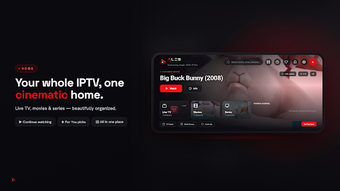
Ales Player: IPTV Player, developed by Ales Player, is an Android multimedia app for playing live TV and on-demand streams from private sources. It loads user-provided M3U, M3U8 and Xtream Codes playlists, surfaces schedules through an Electronic Program Guide, and organizes items with TMDB metadata for browsing. The app offers Picture-in-Picture, hardware acceleration, parental PIN protection, gesture controls and multiple playlist management. It targets Android and Android TV users who need a professional, ad-free player for legally obtained IPTV streams.

Unlock your creativity with Adobe Stock
Get 10 images or 1 video with a free trial
How the interface frames viewing on mobile and TV
Ales Player uses a cinematic, landscape-first UI that keeps catalogue browsing and playback on a widescreen layout even on phones. That orientation-first design removes an extra step between discovery and watching, so posters, episode details and schedule tiles remain visible during selection. The layout suits viewers who want a TV-like presentation on handheld devices, supporting quick visual navigation without switching between portrait and full-screen modes.
What video codecs and playback performance it handles
The player supports modern codecs including H.265 (HEVC) and AV1, enabling compatibility with current stream encodings. Those codec capabilities contribute to steady playback of high-resolution feeds on capable devices, and the developer highlights stability as a design priority. Users with dense channel lineups or demanding streams should expect consistent behaviour rather than experimental decoder handling.
Is it practical for Android TV and remote control navigation
The app adapts its interface for a '10-foot experience' with explicit D-pad navigation so remote control use is straightforward. QR code sign-in simplifies entering credentials on TV boxes, and channel switching is tuned for rapid access across large lineups. These choices make the app appropriate for living-room setups where a remote or D-pad is the primary input method rather than touch gestures.
How personalization, parental controls, and recommendations function
Personalisation combines TMDB-driven artwork with watch-history suggestions that surface similar titles and trailers beside listings. Parental features include hidden-category options to restrict access to sections of the library. The developer also emphasizes user privacy and an ad-free viewing environment, so metadata, cast details and ratings appear as part of a focused browsing experience rather than promotional overlays.
A focused choice for viewers who curate their own streams
The app is a considered option for Android and Android TV users who want a privacy-minded, playback-focused player for curated IPTV collections. Its trade-off is that it places content sourcing and playlist organisation on the user rather than providing channels. Choose this tool when you prefer a quiet, TV-oriented viewing shell and are prepared to manage your own media lists.